> ## Documentation Index
> Fetch the complete documentation index at: https://docs.utilified.com/llms.txt
> Use this file to discover all available pages before exploring further.
# DataHub
> Manage the shared reference data — dates, factors, time-of-use schedules, and units — that underpins tariffs, validation, and reporting across your organisation.
DataHub is the central library for the reference data that the rest of UMS depends on. Tariffs, validation rules, and reports all read from these shared records, so keeping them accurate and consistent keeps the rest of the platform accurate too.
You reach DataHub at `/datahub`. The home page groups reference data into collapsible categories — **Temporal Data**, **Technical Specifications**, **Geographic Reference**, and **Infrastructure** — and a **Search data types…** field in the top-right filters the cards as you type.
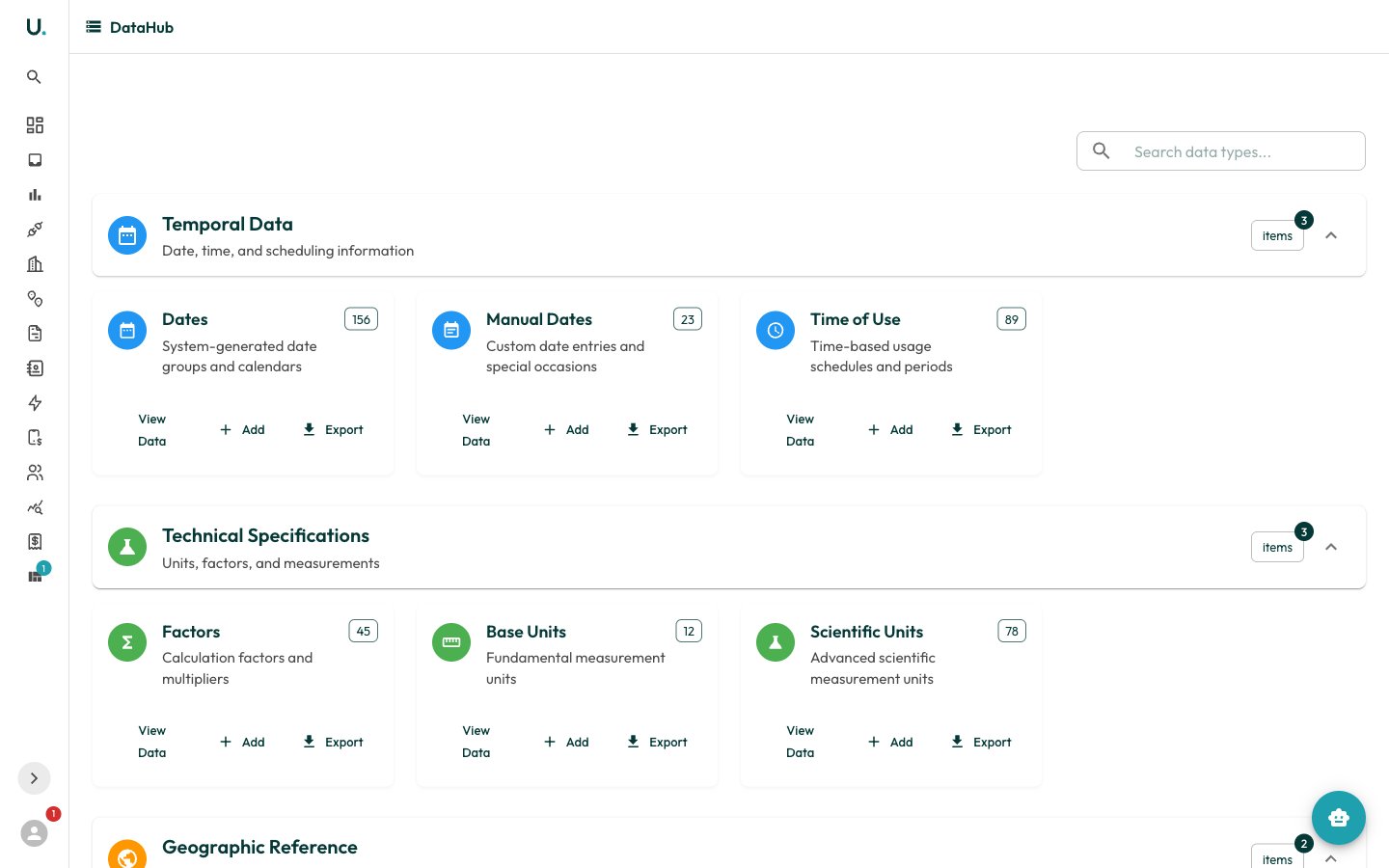 Each card shows the data type, a short description, and a count of existing records. The card actions let you:
* **View Data** — open the full record list for that type in a dialog
* **Add** — create a new reference record
* **Export** — download the records
Selecting a card opens a data grid in a modal. From there you can open any record to view and edit its detail page.
DataHub holds organisation-shared reference data rather than account-specific records. Changes here can affect how tariffs are priced and how invoices are validated, so edit with care.
This page focuses on the four core reference-data types. The Geographic and Infrastructure categories hold supporting reference data — countries, states, markets, utilities, and namespaces — that follow the same list-and-detail pattern.
## Dates
Date groups are system-generated calendars (for example, public-holiday sets) that time-of-use schedules reference to decide which periods apply on a given day. **Manual Dates** let you add custom or one-off entries on top of the generated groups.
A date group's detail page exposes `id`, `name`, `description`, `date_type`, and `active`.
## Factors
Factors are the calculation factors and multipliers applied during energy and cost calculations — for example, converting or scaling a metered value before it feeds a tariff or report.
A factor group's detail page exposes `id`, `name`, `description`, `type`, and `active`.
## Time of Use (TOU)
Time-of-use records define the time-based periods — such as peak, off-peak, and shoulder — that tariffs price differently. They are the backbone of TOU tariff structures, so accurate TOU definitions are essential for correct invoice validation.
A TOU record's detail page exposes `id`, `name`, `description`, `type`, and `active`.
**TOU** stands for Time of Use — a tariff structure with different rates for peak, off-peak, and shoulder periods. See [Key Concepts](/getting-started/key-concepts) for related terminology.
## Units
Units are the measurement units used throughout the platform. **Base Units** are the fundamental units (for example, kWh for electricity, MJ for gas, kL for water), while **Scientific Units** cover more advanced measurements. Consistent units let UMS normalise consumption across utility types for reporting and validation.
A unit's detail page exposes `id`, `name`, `symbol`, `description`, `type`, and `active`.
## Adding a reference record
On the DataHub home page, find the card for the reference type you want (for example, **Time of Use**).
Click **Add** on the card to begin creating a new entry.
Enter the `name`, `description`, and type-specific fields, and set **Active** as appropriate.
Save the record. It immediately becomes available to the tariffs, validation, and reports that reference it.
Each card shows the data type, a short description, and a count of existing records. The card actions let you:
* **View Data** — open the full record list for that type in a dialog
* **Add** — create a new reference record
* **Export** — download the records
Selecting a card opens a data grid in a modal. From there you can open any record to view and edit its detail page.
DataHub holds organisation-shared reference data rather than account-specific records. Changes here can affect how tariffs are priced and how invoices are validated, so edit with care.
This page focuses on the four core reference-data types. The Geographic and Infrastructure categories hold supporting reference data — countries, states, markets, utilities, and namespaces — that follow the same list-and-detail pattern.
## Dates
Date groups are system-generated calendars (for example, public-holiday sets) that time-of-use schedules reference to decide which periods apply on a given day. **Manual Dates** let you add custom or one-off entries on top of the generated groups.
A date group's detail page exposes `id`, `name`, `description`, `date_type`, and `active`.
## Factors
Factors are the calculation factors and multipliers applied during energy and cost calculations — for example, converting or scaling a metered value before it feeds a tariff or report.
A factor group's detail page exposes `id`, `name`, `description`, `type`, and `active`.
## Time of Use (TOU)
Time-of-use records define the time-based periods — such as peak, off-peak, and shoulder — that tariffs price differently. They are the backbone of TOU tariff structures, so accurate TOU definitions are essential for correct invoice validation.
A TOU record's detail page exposes `id`, `name`, `description`, `type`, and `active`.
**TOU** stands for Time of Use — a tariff structure with different rates for peak, off-peak, and shoulder periods. See [Key Concepts](/getting-started/key-concepts) for related terminology.
## Units
Units are the measurement units used throughout the platform. **Base Units** are the fundamental units (for example, kWh for electricity, MJ for gas, kL for water), while **Scientific Units** cover more advanced measurements. Consistent units let UMS normalise consumption across utility types for reporting and validation.
A unit's detail page exposes `id`, `name`, `symbol`, `description`, `type`, and `active`.
## Adding a reference record
On the DataHub home page, find the card for the reference type you want (for example, **Time of Use**).
Click **Add** on the card to begin creating a new entry.
Enter the `name`, `description`, and type-specific fields, and set **Active** as appropriate.
Save the record. It immediately becomes available to the tariffs, validation, and reports that reference it.