> ## Documentation Index
> Fetch the complete documentation index at: https://docs.utilified.com/llms.txt
> Use this file to discover all available pages before exploring further.
# Reports
> Run pre-built UMS reports on demand or schedule them for recurring email delivery — consumption, invoices, agreements, billing gaps, connections, and more.
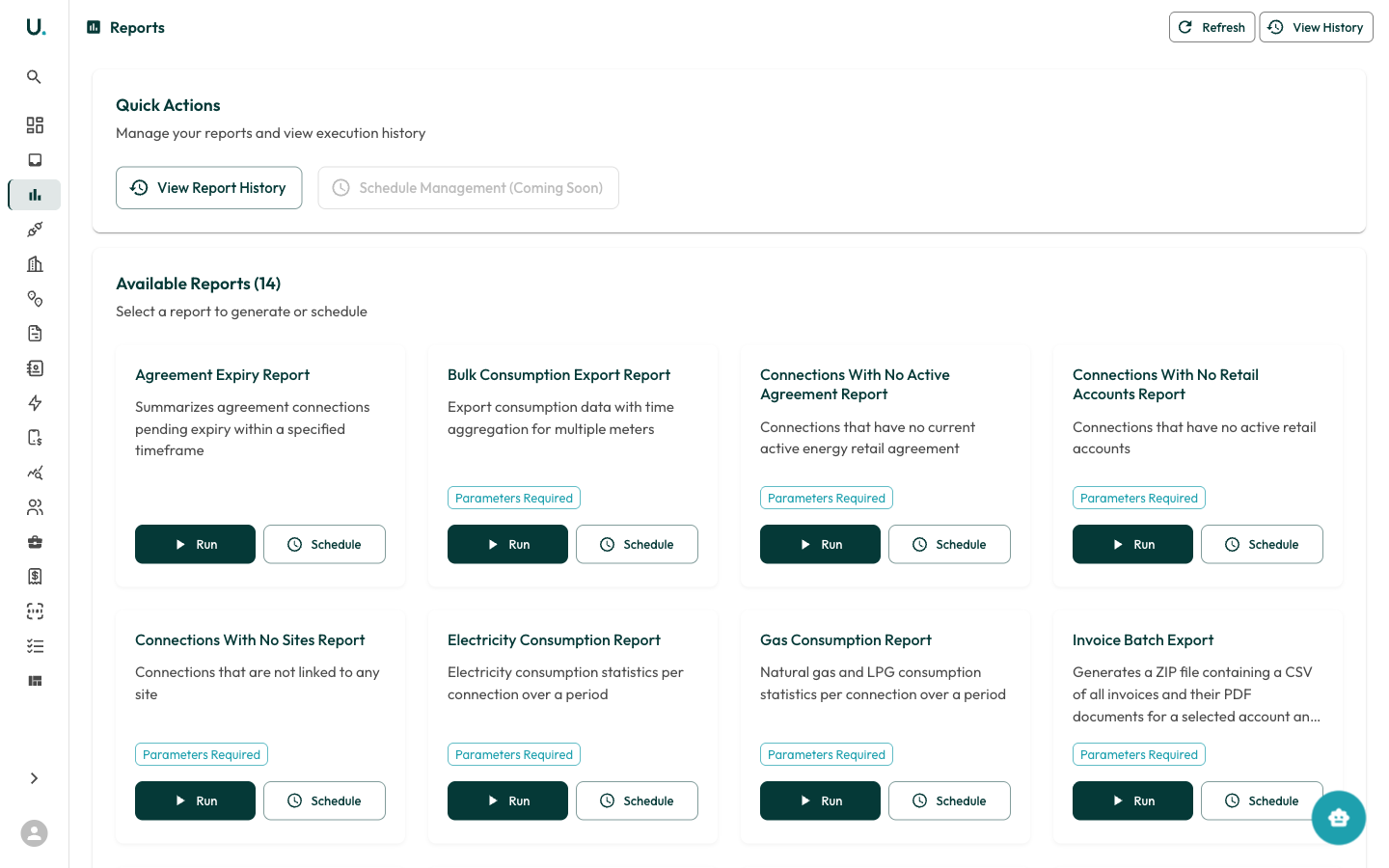
The Reports module provides a library of pre-built reports that you can run on demand or schedule for recurring delivery.
 ## Quick actions
At the top of the Reports page:
* **View Report History** — See previously generated reports and download their results
* **Schedule Management** — Manage recurring report schedules
Top-right buttons:
* **Refresh** — Reload the reports list
* **View History** — Jump to report execution history
## Available reports
There are 14 available reports, each with a description and **Run** / **Schedule** buttons:
| Report | Description |
| ------------------------------------------------- | ------------------------------------------------------------------------------------- |
| **Agreement Expiry Report** | Summarises agreement connections pending expiry within a specified timeframe |
| **Bulk Consumption Export Report** | Exports consumption data with time aggregation for multiple meters |
| **Connections With No Active Agreement Report** | Identifies connections without a current energy retail agreement |
| **Connections With No Retail Accounts Report** | Identifies connections without active retail accounts |
| **Connections With No Sites Report** | Identifies connections not linked to any site |
| **Electricity Consumption Report** | Electricity consumption statistics per connection over a period |
| **Gas Consumption Report** | Natural gas and LPG consumption statistics per connection over a period |
| **Invoice Batch Export** | Generates a ZIP file with CSV and PDF documents for a selected account and date range |
| **Invoice Gap Report** | Detects invoice gaps per retail account and connection |
| **Invoice Report** | Summarises invoices issued over a period for specific accounts |
| **Metering and Energy Agreement End Date Report** | End dates for energy and metering agreements grouped by connection |
| **Monthly Spend Accrual Report** | Monthly spend with accrual projection for incomplete months per connection |
| **Retail Account Transfer Report** | Retail accounts in transfer or pending states requiring action |
| **Water Consumption Report** | Water consumption statistics per connection over a period |
### Running a report
Locate the report in the list of available reports.
If the report requires parameters, a form will appear asking for date ranges, accounts, or other filters.
The report generates in the background.
You will receive a notification when it is ready to download.
### Scheduling a report
Click **Schedule** on any report to set up recurring generation (for example, weekly or monthly). Completed reports are delivered via notification.
## Quick actions
At the top of the Reports page:
* **View Report History** — See previously generated reports and download their results
* **Schedule Management** — Manage recurring report schedules
Top-right buttons:
* **Refresh** — Reload the reports list
* **View History** — Jump to report execution history
## Available reports
There are 14 available reports, each with a description and **Run** / **Schedule** buttons:
| Report | Description |
| ------------------------------------------------- | ------------------------------------------------------------------------------------- |
| **Agreement Expiry Report** | Summarises agreement connections pending expiry within a specified timeframe |
| **Bulk Consumption Export Report** | Exports consumption data with time aggregation for multiple meters |
| **Connections With No Active Agreement Report** | Identifies connections without a current energy retail agreement |
| **Connections With No Retail Accounts Report** | Identifies connections without active retail accounts |
| **Connections With No Sites Report** | Identifies connections not linked to any site |
| **Electricity Consumption Report** | Electricity consumption statistics per connection over a period |
| **Gas Consumption Report** | Natural gas and LPG consumption statistics per connection over a period |
| **Invoice Batch Export** | Generates a ZIP file with CSV and PDF documents for a selected account and date range |
| **Invoice Gap Report** | Detects invoice gaps per retail account and connection |
| **Invoice Report** | Summarises invoices issued over a period for specific accounts |
| **Metering and Energy Agreement End Date Report** | End dates for energy and metering agreements grouped by connection |
| **Monthly Spend Accrual Report** | Monthly spend with accrual projection for incomplete months per connection |
| **Retail Account Transfer Report** | Retail accounts in transfer or pending states requiring action |
| **Water Consumption Report** | Water consumption statistics per connection over a period |
### Running a report
Locate the report in the list of available reports.
If the report requires parameters, a form will appear asking for date ranges, accounts, or other filters.
The report generates in the background.
You will receive a notification when it is ready to download.
### Scheduling a report
Click **Schedule** on any report to set up recurring generation (for example, weekly or monthly). Completed reports are delivered via notification.