> ## Documentation Index
> Fetch the complete documentation index at: https://docs.utilified.com/llms.txt
> Use this file to discover all available pages before exploring further.
# Retail Accounts
> Manage the account references retailers assign to your connections — the link between your internal accounts and the retailer's billing system, and how incoming invoices are matched.
Retail accounts represent the account references that energy retailers assign to your [connections](/connections). They are the key link between your internal account structure and the retailer's billing system — they are how incoming [invoices](/invoices) get matched to the correct [account](/accounts) and connection.
 ## Retail accounts list
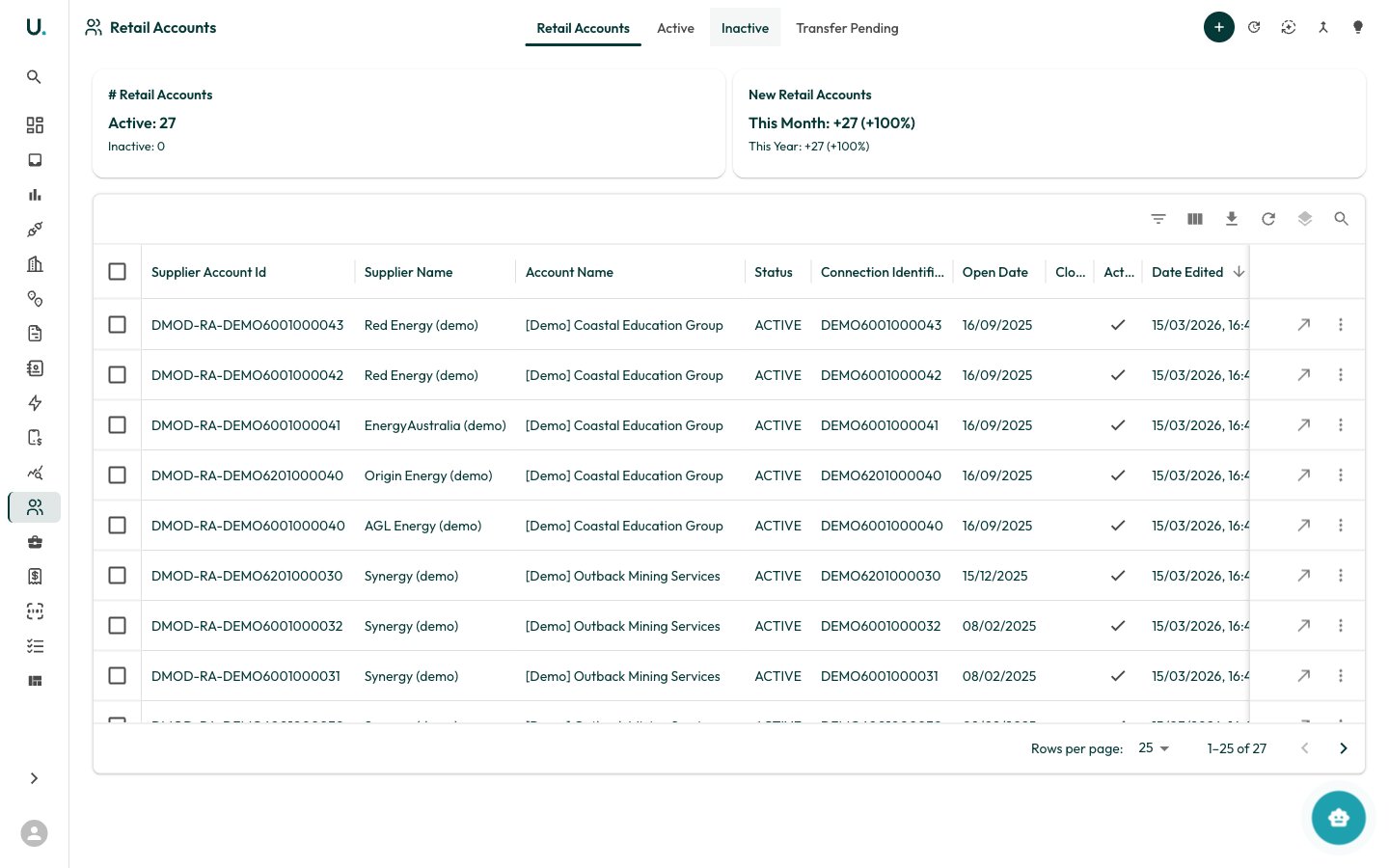
The Retail Accounts page displays all retail account references in your organisation in a data grid. Tabs across the top filter the list:
* **Retail Accounts** — All active retail accounts
* **Active** — Status `ACTIVE` only
* **Inactive** — Status `INACTIVE` only
* **Transfer Pending** — Accounts in transition (`PENDING_ACTIVE`, `PENDING_INACTIVE`, or `DRAFT`)
| Column | Description |
| ------------------------------ | ------------------------------------------------------------------ |
| **Retail Account No.** | The retailer's account reference (`supplier_account_id`) |
| **Supplier** | The energy retailer that issued the account |
| **Account** | Your internal account the retail account belongs to |
| **Status** | Lifecycle status (see below) |
| **Connection** | The linked connection identifier (NMI / MIRN) |
| **Invoice Validation** | Whether automated invoice validation is enabled for this account |
| **Gap Check** | Whether billing-period gap detection is enabled |
| **Match Tolerance** | Allowable variance when matching invoice values during validation |
| **Expected Billing Frequency** | Cadence the retailer is expected to bill at (used by gap checks) |
| **Open Date** / **Close Date** | When the account reference was opened and closed with the retailer |
### Status meanings
| Status | Meaning |
| --------------------- | --------------------------------------------------------------------- |
| **ACTIVE** | Currently billing — the live account for the connection |
| **PENDING\_ACTIVE** | Activation in progress (for example, a transfer-in not yet confirmed) |
| **SUGGESTED\_ACTIVE** | System-suggested as the likely active account, awaiting confirmation |
| **PENDING\_INACTIVE** | Closure in progress (transfer-out not yet confirmed) |
| **INACTIVE** | Closed — no longer billing |
| **DRAFT** | Created but not yet activated |
### Toolbar actions
The header provides:
* **New Retail Account** (**+**) — Open a drawer to create a retail account
* **Update from CSV** — Bulk-update existing retail accounts from a spreadsheet
* **Generate Retail Accounts** — Auto-generate accounts from existing connection data
* **Merge Retail Accounts** — Combine duplicate accounts (see below)
* **Merge Recommendations** — Review system-suggested merges of likely-duplicate accounts
### Creating a retail account
Click **New Retail Account** to open a drawer. You supply the retailer reference (`supplier_account_id`), and link the **Supplier**, **Account**, and **Connection**. You can also set the open/close dates, status, validation and gap-check toggles, match tolerance, expected billing frequency, and payment terms.
A retail account links one connection to one retailer reference. When a connection transfers between retailers, a new retail account is created and the old one is closed — keeping a full billing history per retailer.
## Retail account detail page
## Retail accounts list
The Retail Accounts page displays all retail account references in your organisation in a data grid. Tabs across the top filter the list:
* **Retail Accounts** — All active retail accounts
* **Active** — Status `ACTIVE` only
* **Inactive** — Status `INACTIVE` only
* **Transfer Pending** — Accounts in transition (`PENDING_ACTIVE`, `PENDING_INACTIVE`, or `DRAFT`)
| Column | Description |
| ------------------------------ | ------------------------------------------------------------------ |
| **Retail Account No.** | The retailer's account reference (`supplier_account_id`) |
| **Supplier** | The energy retailer that issued the account |
| **Account** | Your internal account the retail account belongs to |
| **Status** | Lifecycle status (see below) |
| **Connection** | The linked connection identifier (NMI / MIRN) |
| **Invoice Validation** | Whether automated invoice validation is enabled for this account |
| **Gap Check** | Whether billing-period gap detection is enabled |
| **Match Tolerance** | Allowable variance when matching invoice values during validation |
| **Expected Billing Frequency** | Cadence the retailer is expected to bill at (used by gap checks) |
| **Open Date** / **Close Date** | When the account reference was opened and closed with the retailer |
### Status meanings
| Status | Meaning |
| --------------------- | --------------------------------------------------------------------- |
| **ACTIVE** | Currently billing — the live account for the connection |
| **PENDING\_ACTIVE** | Activation in progress (for example, a transfer-in not yet confirmed) |
| **SUGGESTED\_ACTIVE** | System-suggested as the likely active account, awaiting confirmation |
| **PENDING\_INACTIVE** | Closure in progress (transfer-out not yet confirmed) |
| **INACTIVE** | Closed — no longer billing |
| **DRAFT** | Created but not yet activated |
### Toolbar actions
The header provides:
* **New Retail Account** (**+**) — Open a drawer to create a retail account
* **Update from CSV** — Bulk-update existing retail accounts from a spreadsheet
* **Generate Retail Accounts** — Auto-generate accounts from existing connection data
* **Merge Retail Accounts** — Combine duplicate accounts (see below)
* **Merge Recommendations** — Review system-suggested merges of likely-duplicate accounts
### Creating a retail account
Click **New Retail Account** to open a drawer. You supply the retailer reference (`supplier_account_id`), and link the **Supplier**, **Account**, and **Connection**. You can also set the open/close dates, status, validation and gap-check toggles, match tolerance, expected billing frequency, and payment terms.
A retail account links one connection to one retailer reference. When a connection transfers between retailers, a new retail account is created and the old one is closed — keeping a full billing history per retailer.
## Retail account detail page
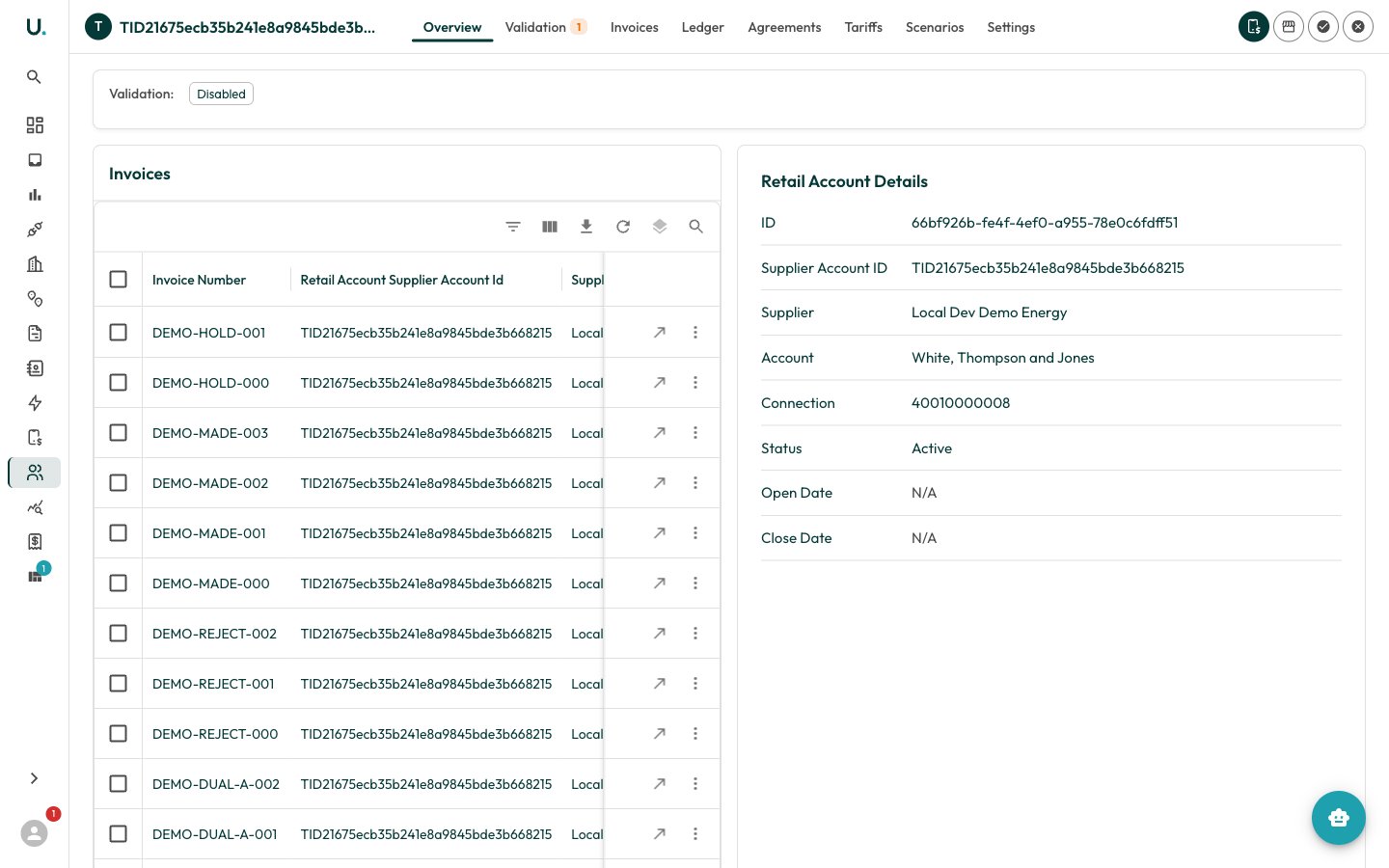 Clicking a retail account opens the detail page with a tabbed interface:
| Tab | Description |
| -------------- | -------------------------------------------------------------------------------- |
| **Overview** | Account details, key dates, and summary statistics |
| **Validation** | Invoice-validation and gap-check toggles, run validation, and open gaps (badged) |
| **Invoices** | Invoices billed against this retail account, with document preview |
| **Ledger** | Financial ledger of charges and payments, with an outstanding balance |
| **Agreements** | Energy [agreements](/agreements) linked to this retail account |
| **Tariffs** | [Tariff](/tariffs) rates assigned to this retail account |
| **Scenarios** | Tariff-review [scenarios](/scenarios) and modelling |
| **Settings** | Account-specific configuration |
Header actions let you **Add a Tariff**, create a **Retail Sub-Account** (a child account under this one), **Activate** the account, or **Close** it. Activating an account also closes any other Active or pending accounts on the connection; closing prompts for a close date and can be marked as *Deactivation Pending*.
### Merging retail accounts
When duplicate retail accounts exist for the same connection, merge them into a single root. The merge is **irreversible** — all agreements, connections, invoices, and related data move into the chosen root account.
Choose the **root** account to keep, then select the other accounts to merge into it.
Confirm the root and the accounts being merged. Each shows its supplier reference and open/close dates.
Run the merge. Data is reassigned to the root and the merged accounts are processed.
Review per-account **Success**/**Failed** results. Download the results as JSON, resolve any exceptions, and delete successfully-merged accounts as needed.
Use **Merge Recommendations** to let UMS surface likely duplicates automatically instead of selecting them by hand.
Clicking a retail account opens the detail page with a tabbed interface:
| Tab | Description |
| -------------- | -------------------------------------------------------------------------------- |
| **Overview** | Account details, key dates, and summary statistics |
| **Validation** | Invoice-validation and gap-check toggles, run validation, and open gaps (badged) |
| **Invoices** | Invoices billed against this retail account, with document preview |
| **Ledger** | Financial ledger of charges and payments, with an outstanding balance |
| **Agreements** | Energy [agreements](/agreements) linked to this retail account |
| **Tariffs** | [Tariff](/tariffs) rates assigned to this retail account |
| **Scenarios** | Tariff-review [scenarios](/scenarios) and modelling |
| **Settings** | Account-specific configuration |
Header actions let you **Add a Tariff**, create a **Retail Sub-Account** (a child account under this one), **Activate** the account, or **Close** it. Activating an account also closes any other Active or pending accounts on the connection; closing prompts for a close date and can be marked as *Deactivation Pending*.
### Merging retail accounts
When duplicate retail accounts exist for the same connection, merge them into a single root. The merge is **irreversible** — all agreements, connections, invoices, and related data move into the chosen root account.
Choose the **root** account to keep, then select the other accounts to merge into it.
Confirm the root and the accounts being merged. Each shows its supplier reference and open/close dates.
Run the merge. Data is reassigned to the root and the merged accounts are processed.
Review per-account **Success**/**Failed** results. Download the results as JSON, resolve any exceptions, and delete successfully-merged accounts as needed.
Use **Merge Recommendations** to let UMS surface likely duplicates automatically instead of selecting them by hand.