> ## Documentation Index
> Fetch the complete documentation index at: https://docs.utilified.com/llms.txt
> Use this file to discover all available pages before exploring further.
# Tariffs
> Define the rate structures retailers charge for electricity, gas, and water — used to validate invoice charges and calculate expected costs.
Tariffs define the rate structures that energy retailers charge for electricity, gas, and water. They are used to validate invoice charges, calculate expected costs, and run brokerage commission calculations.
 ## How tariffs are structured
UMS models pricing in three nested layers:
| Layer | Description |
| ---------------- | ------------------------------------------------------------------------------------------------------------------------------------------------- |
| **Tariff Group** | The overall rate plan (for example, "Business Time of Use"), linked to a `supplier` and an [agreement](/agreements) |
| **Tariff** | A date-scoped *version* of the group, with a `start_date` and optional `end_date` — lets rates change over time while keeping history |
| **Tariff Rate** | An individual charge component within a version, with a `category` (peak, off-peak, supply, demand), `value`, and `display_units` (c/kWh, \$/day) |
Each rate can carry **rate quantities** — the applicable factors or consumption blocks that govern when the rate applies. See [Key Concepts](/getting-started/key-concepts) for where tariffs sit in the wider data model.
## Tariffs list
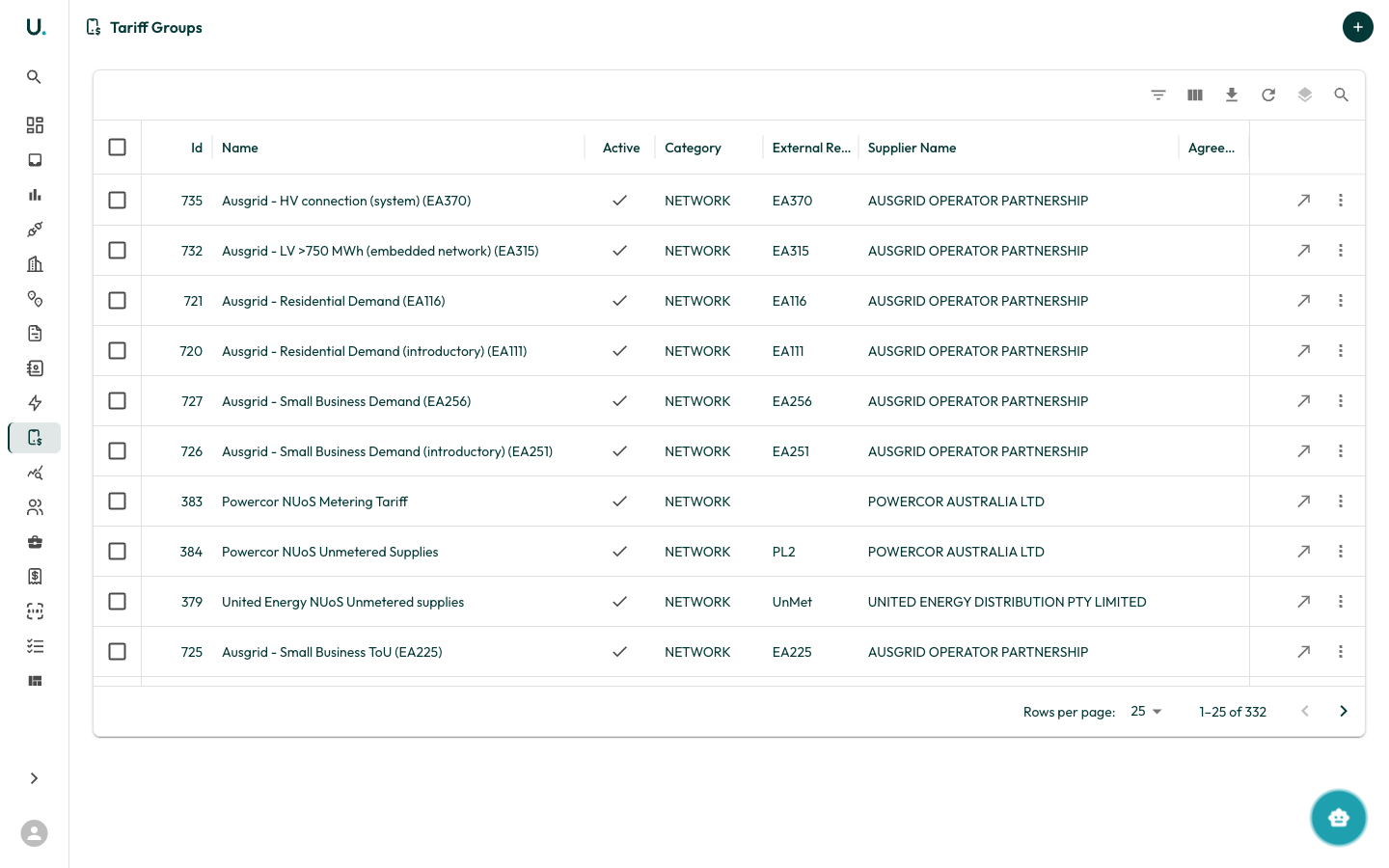
The **Tariff Groups** page displays every tariff group in your organisation in a data grid:
| Column | Description |
| ---------------------- | -------------------------------------------- |
| **Id** | Internal identifier for the tariff group |
| **Name** | Descriptive name of the rate plan |
| **Active** | Whether the tariff group is currently in use |
| **Category** | Utility/rate category for the group |
| **External Reference** | The retailer's own reference for this tariff |
| **Supplier** | The energy retailer the tariff belongs to |
| **Agreement** | The linked [agreement](/agreements) |
| **Description** | Free-text notes (hidden by default) |
The toolbar provides filtering, column visibility, export, density, and quick-search, matching the other list pages. Click **New Tariff Group** (the **+** action) to launch the **Tariff Creation Wizard**.
For the full build walkthrough — wizard steps, manual rate entry, and CSV import — see the [Managing Tariffs](/guides/managing-tariffs) guide.
## Tariff detail page
## How tariffs are structured
UMS models pricing in three nested layers:
| Layer | Description |
| ---------------- | ------------------------------------------------------------------------------------------------------------------------------------------------- |
| **Tariff Group** | The overall rate plan (for example, "Business Time of Use"), linked to a `supplier` and an [agreement](/agreements) |
| **Tariff** | A date-scoped *version* of the group, with a `start_date` and optional `end_date` — lets rates change over time while keeping history |
| **Tariff Rate** | An individual charge component within a version, with a `category` (peak, off-peak, supply, demand), `value`, and `display_units` (c/kWh, \$/day) |
Each rate can carry **rate quantities** — the applicable factors or consumption blocks that govern when the rate applies. See [Key Concepts](/getting-started/key-concepts) for where tariffs sit in the wider data model.
## Tariffs list
The **Tariff Groups** page displays every tariff group in your organisation in a data grid:
| Column | Description |
| ---------------------- | -------------------------------------------- |
| **Id** | Internal identifier for the tariff group |
| **Name** | Descriptive name of the rate plan |
| **Active** | Whether the tariff group is currently in use |
| **Category** | Utility/rate category for the group |
| **External Reference** | The retailer's own reference for this tariff |
| **Supplier** | The energy retailer the tariff belongs to |
| **Agreement** | The linked [agreement](/agreements) |
| **Description** | Free-text notes (hidden by default) |
The toolbar provides filtering, column visibility, export, density, and quick-search, matching the other list pages. Click **New Tariff Group** (the **+** action) to launch the **Tariff Creation Wizard**.
For the full build walkthrough — wizard steps, manual rate entry, and CSV import — see the [Managing Tariffs](/guides/managing-tariffs) guide.
## Tariff detail page
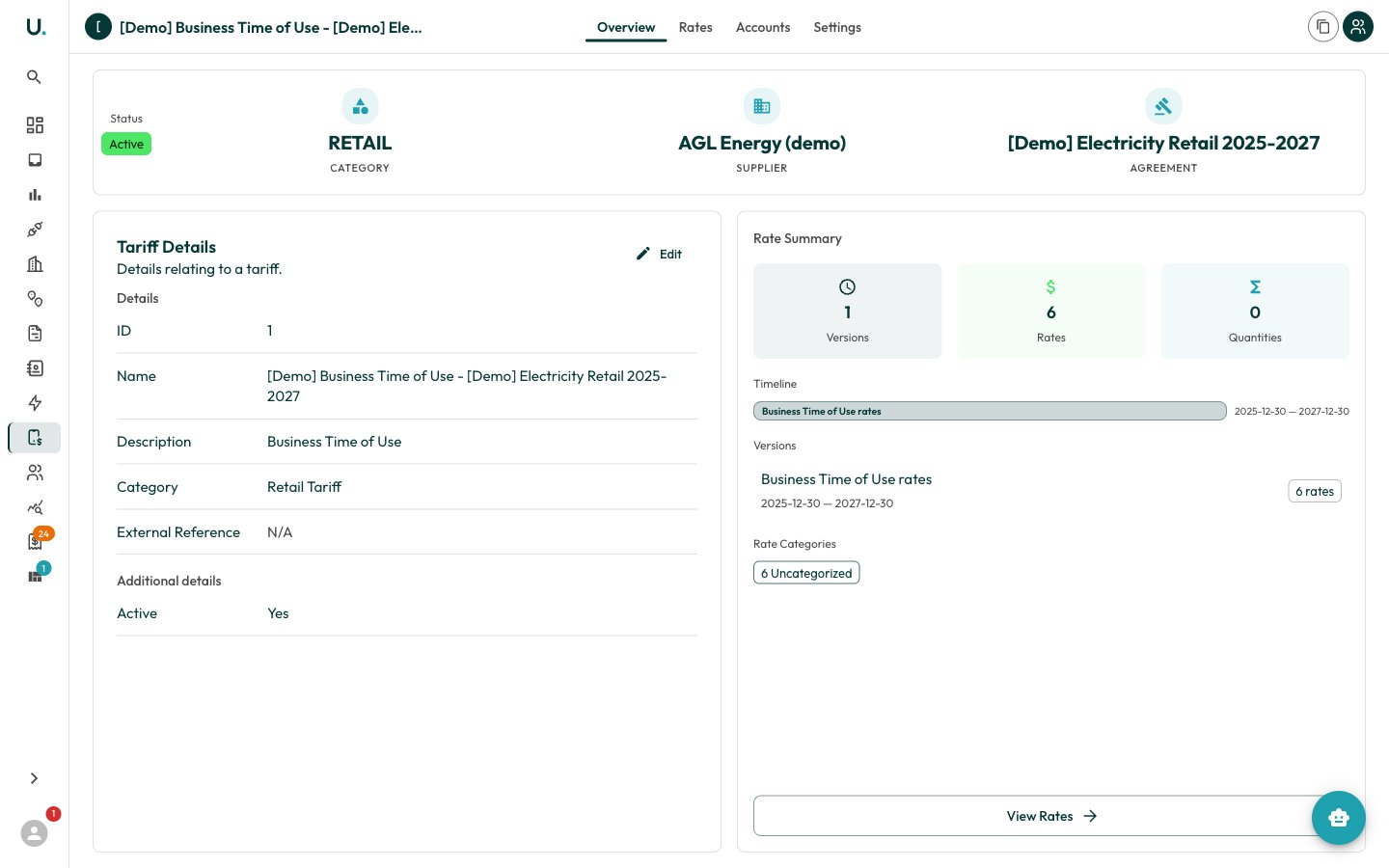 Selecting a tariff group opens the detail page with a tabbed interface:
| Tab | Description |
| ------------ | --------------------------------------------------------------------------------------------------------------------------------------------- |
| **Overview** | Status, category, supplier, and agreement, plus a rate summary — version count, total rates, quantities, a timeline, and a category breakdown |
| **Rates** | The rates for each tariff version, shown as an interactive tree or a flat table |
| **Accounts** | The [retail accounts](/retail-accounts) this tariff group is assigned to |
| **Settings** | Edit core fields (name, category, supplier, agreement, external reference) or archive/delete the group |
The header offers two actions: **Duplicate** (clone the group with all of its rates) and **Add to Retail Account** (create a tariff assignment).
### Rates tab
The Rates tab toggles between a **Tree** view (rates grouped under their version) and a **Table** view with columns for `description`, `category`, `value`, `display_units`, and `tax_applicable`. Two controls drive it:
* **New Version** — create a date-scoped tariff version (`description`, `start_date`, optional `end_date`) so rates can change over time. A group must have at least one version before rates can be added.
* **Add Rate** — add an individual rate component to the current version.
## Tariff assignments
A **tariff assignment** links a tariff group to a retailer's [retail account](/retail-accounts) for a date range, so incoming invoices are validated against the correct rates. Each assignment records the `tariffgroup`, `account` (retail account), `start_date`, and `end_date`, and can be edited or removed from the assignment detail page.
## Tariff reviews and scenarios
Comparing tariffs against actual or modelled consumption now lives under **Scenarios** — the tariff review routes redirect there. Use scenarios to model expected costs across rate plans before committing. See [Building Scenarios](/guides/building-scenarios) for the workflow.
Accurate tariffs are essential for invoice validation and brokerage calculations — keep versions and effective dates current as retailers re-price.
Selecting a tariff group opens the detail page with a tabbed interface:
| Tab | Description |
| ------------ | --------------------------------------------------------------------------------------------------------------------------------------------- |
| **Overview** | Status, category, supplier, and agreement, plus a rate summary — version count, total rates, quantities, a timeline, and a category breakdown |
| **Rates** | The rates for each tariff version, shown as an interactive tree or a flat table |
| **Accounts** | The [retail accounts](/retail-accounts) this tariff group is assigned to |
| **Settings** | Edit core fields (name, category, supplier, agreement, external reference) or archive/delete the group |
The header offers two actions: **Duplicate** (clone the group with all of its rates) and **Add to Retail Account** (create a tariff assignment).
### Rates tab
The Rates tab toggles between a **Tree** view (rates grouped under their version) and a **Table** view with columns for `description`, `category`, `value`, `display_units`, and `tax_applicable`. Two controls drive it:
* **New Version** — create a date-scoped tariff version (`description`, `start_date`, optional `end_date`) so rates can change over time. A group must have at least one version before rates can be added.
* **Add Rate** — add an individual rate component to the current version.
## Tariff assignments
A **tariff assignment** links a tariff group to a retailer's [retail account](/retail-accounts) for a date range, so incoming invoices are validated against the correct rates. Each assignment records the `tariffgroup`, `account` (retail account), `start_date`, and `end_date`, and can be edited or removed from the assignment detail page.
## Tariff reviews and scenarios
Comparing tariffs against actual or modelled consumption now lives under **Scenarios** — the tariff review routes redirect there. Use scenarios to model expected costs across rate plans before committing. See [Building Scenarios](/guides/building-scenarios) for the workflow.
Accurate tariffs are essential for invoice validation and brokerage calculations — keep versions and effective dates current as retailers re-price.